
Download CuteRank – Simple Keyword Ranking Tracker for Windows, Mac & Mobile
Overview
Keeping an eye on keyword rankings is a daily chore for anyone who runs a blog, an e‑commerce store, or any kind of website that depends on organic traffic. While the market is flooded with heavyweight SEO suites, many users simply need a lightweight, no‑frills tool that delivers clear, up‑to‑date ranking data without a steep learning curve. That’s where CuteRank steps in.
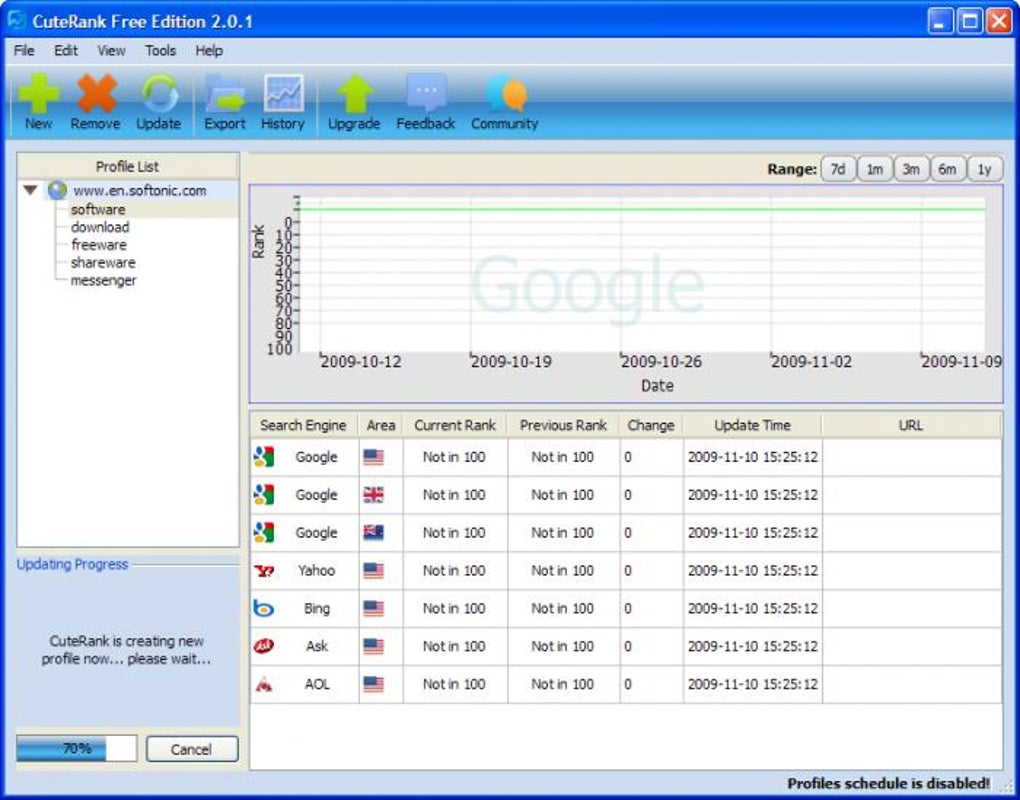
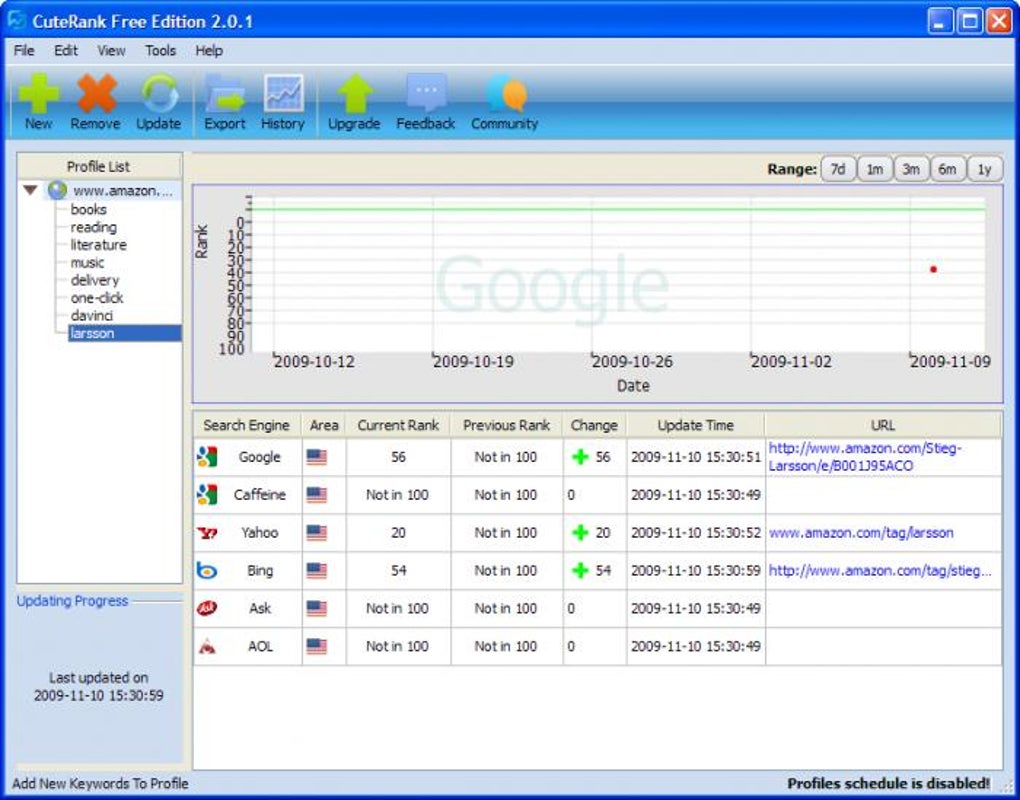
Designed as an uncomplicated desktop program, CuteRank connects to six major search engines—Google, Caffeine, Yahoo, Bing, Ask, and AOL—to pull the current position of any keyword you enter. Results are displayed in a tidy table that shows the engine, geographical area, rank, change since the last check, the exact time of the update, and the URL that holds the ranking. What makes CuteRank stand out is its emphasis on readability.
The interface relies on plain colours and straightforward headings, letting you spot trends at a glance. You can also schedule automatic updates, which means the software will revisit your keywords at preset intervals and log the new positions. All historic data is stored locally, and you have the option to export the entire log as CSV, PDF, or HTML for reporting or backup purposes.
While CuteRank does not replace the deep analytics offered by premium SEO platforms, it fills a niche for users who want a quick snapshot of performance and a reliable way to keep a simple record over time. The inclusion of the now‑defunct Caffeine engine is a minor quirk—explained on the developer’s blog but not directly within the app—but it does not affect the core functionality. In short, if you are after a clear layout, easy export options, and a tool that stays out of the way, CuteRank is worth a download.
Key Features
- Support for six search engines: Google, Caffeine, Yahoo, Bing, Ask, and AOL.
- Real‑time ranking display with columns for engine, region, rank, change, timestamp, and URL.
- Scheduled automatic updates to monitor keyword movement without manual intervention.
- Historical data storage that lets you view ranking trends over weeks or months.
- Export capabilities in CSV, PDF, and HTML formats for easy reporting or sharing.
- Simple CSV import to bulk‑add keywords, saving time on initial setup.
- Customizable view options, such as hiding extra columns or showing only the most recent profiles.
- Lightweight desktop client that runs on Windows, macOS, and can be accessed via remote desktop on mobile devices.
- Integrated help center with step‑by‑step guides and troubleshooting tips.
- Free to download with optional paid upgrades for advanced scheduling and multi‑user support.
Installation, Usage & Compatibility
Installing CuteRank is a breeze. The installer is available as a single executable for Windows (64‑bit) and a DMG package for macOS. Simply download the appropriate file, run the installer, and follow the on‑screen prompts. The program requires .NET Framework 4.7 (Windows) or macOS 10.13 or later, both of which are pre‑installed on most modern machines. Once installed, launch CuteRank from the desktop shortcut or the Applications folder.
The first time you open the app, you’ll be greeted by a clean dashboard. Click the “Add Keywords” button, paste a list of keywords (one per line), and choose the search engines you wish to track. For each keyword you can specify the target region—US, UK, Canada, etc.—and the URL you expect to rank for. After confirming, CuteRank will perform an immediate check and populate the results table.
To set up scheduled updates, go to the “Profiles” tab, create a new profile, and define the frequency (hourly, daily, weekly). The software runs in the background and writes each new result to a local SQLite database, which you can view anytime by selecting the profile from the left‑hand list. Exporting is just as simple: choose the profile, click “Export,” and select your preferred format.
Operating System Compatibility: CuteRank runs natively on Windows 10/11 and macOS Catalina (10.15) and later. While there is no dedicated mobile app, the desktop client can be accessed remotely via remote‑desktop tools on Android or iOS, allowing you to monitor rankings on the go.
Pros & Cons, Conclusion & FAQ
Pros
- Intuitive interface that requires no training.
- Fast data retrieval across multiple search engines.
- Automatic scheduling eliminates manual checks.
- Export options cover most reporting needs.
- Free core version makes it accessible for small sites.
Cons
- Includes the obsolete Caffeine engine, which may confuse newcomers.
- Lacks deep analytics like traffic estimation or SERP feature tracking.
- No native mobile app; remote desktop is required for mobile access.
- Advanced scheduling and multi‑user features are locked behind a paid upgrade.
Conclusion
If your primary goal is to keep a quick, reliable eye on keyword positions without drowning in data, CuteRank delivers exactly that. Its straightforward design, combined with scheduled updates and versatile export formats, makes it a solid addition to any webmaster’s toolkit. While power users may miss out on advanced SEO metrics, the free version offers enough value to justify a download for bloggers, small‑business owners, and agencies managing a handful of client sites. Give CuteRank a try today and experience a hassle‑free way to stay on top of your rankings.
FAQ
Can I track more than 100 keywords at once?
Yes. The free version allows up to 500 keywords per profile. If you need to monitor thousands of terms, consider the paid upgrade which raises the limit to 5,000 keywords.
Does CuteRank provide data for local pack results?
No. CuteRank focuses on traditional organic rankings. For local pack and featured snippet tracking, you’ll need a dedicated local SEO tool.
How secure is my data when using CuteRank?
All data is stored locally on your device in an encrypted SQLite database. The software does not transmit your keyword list or results to external servers unless you explicitly use the export function.
Can I schedule updates for different time zones?
Yes. When creating a profile you can set the time zone for each schedule, ensuring that the check runs at the appropriate local time for the target region.
Is there a trial period for the premium features?
A 14‑day free trial is offered for the premium tier, giving you access to unlimited scheduling, multi‑user collaboration, and priority support.







